Reviews Widget for Google
Show your Google reviews and rating on your own site as a fast grid, slider, list or badge. All features free: no account, no trial, no review limit.
Two ways to connect
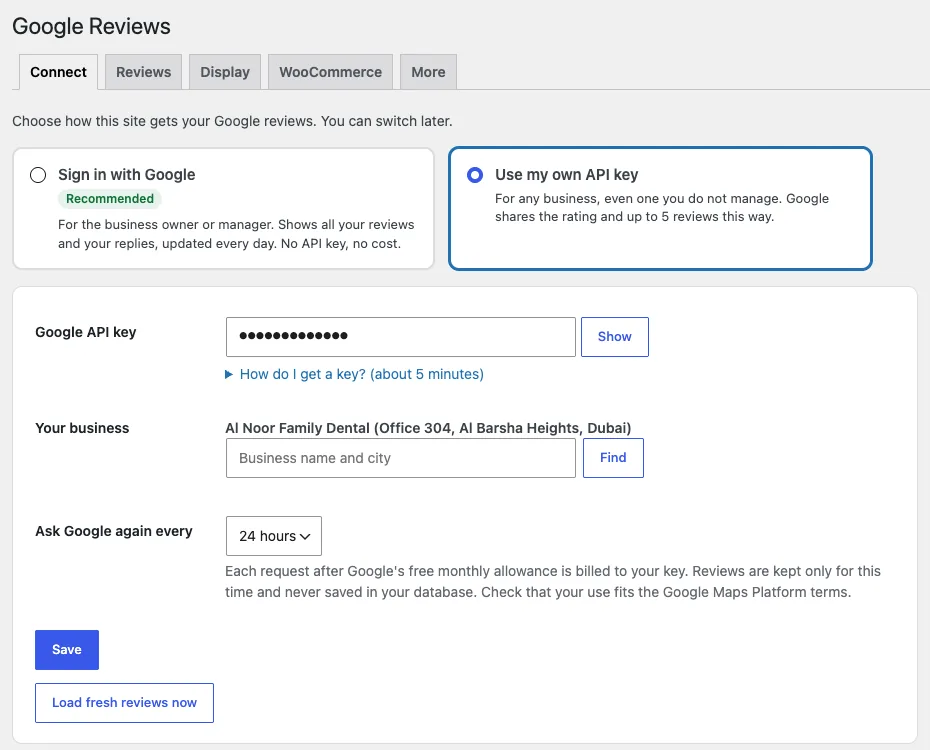
Sign in with Google (recommended)
If you own or manage the business on Google, click Sign in with Google and allow read access. The plugin loads all of your reviews and your replies through Google's official Business Profile API, then updates them once a day by itself. Reviews deleted on Google disappear from your site at the next update. No API key and no Google Cloud project needed.
Use your own API key
For a business you do not manage, for example an agency setting up a client site before getting access. Paste a Google Maps Platform API key and search for the business by name. Google shares the rating, review count and up to 5 reviews this way. They are kept only for the time you choose (1 to 24 hours) and never saved in your database.
Features
Four layouts
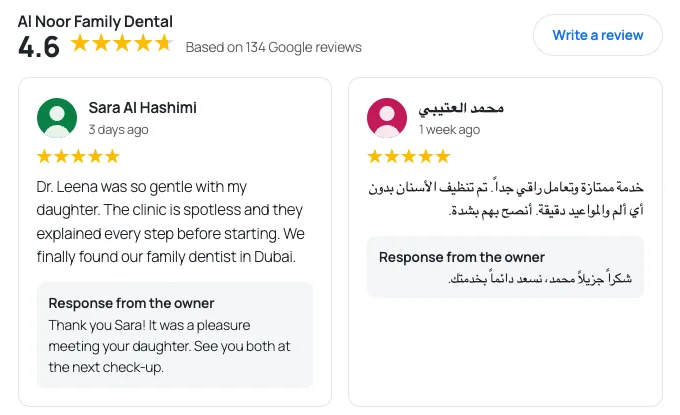
- Grid: cards that fill the width and wrap on phones.
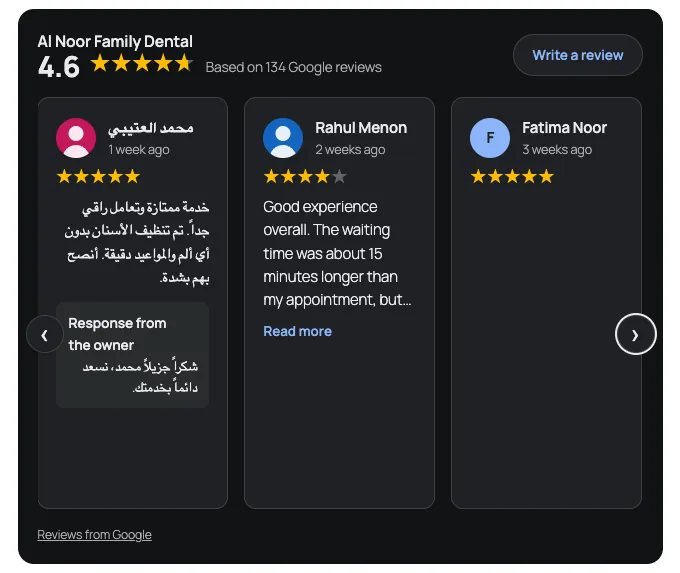
- Slider: swipe on phones, arrow buttons on desktop.
- List: one review under another.
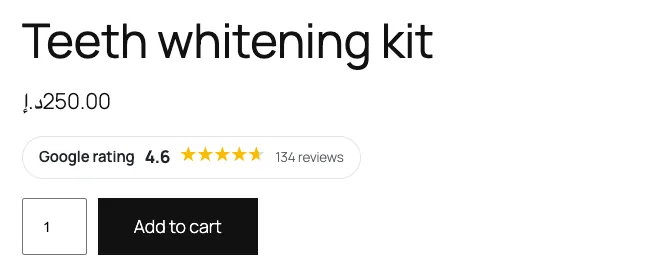
- Rating badge: your score, stars and review count in one line, linking to your Google listing.
- Light, dark or follow the visitor's device, and right to left for Arabic.
Choose what to show
- Only reviews with 4 or 5 stars, or any minimum you like.
- Newest first, highest first or lowest first.
- Hide single reviews, or reviews with stars but no text.
- Show or hide reviewer photos and your replies.
- Long reviews are cut with a Read more button.
Fast and clean
- Plain HTML made on your server, not an iframe, so search engines and AI crawlers can read the reviews.
- A small stylesheet and a script of about 1 KB compressed, loaded only on pages that show reviews.
- The badge needs no script at all.
Where to put it
- The Google Reviews block in the block editor, with a live preview.
- The [google_reviews] shortcode in Elementor, Divi, WPBakery, Beaver Builder, widget areas or the classic editor.
- A Display screen that builds the shortcode for any look, with a live preview.
- On WordPress 6.9 and later, AI agents can read the rating and run an update through the Abilities API (administrators only).
WooCommerce
- Google rating badge under the Add to cart button.
- The same badge at checkout, next to the order total.
- Works with classic and block product pages and checkout.
Free, with nothing locked
- No account, no trial and no review limit.
- Unlimited widgets and daily updates, all free.
- No branding added to your site.
- Made in Dubai by Nadeem Farooqi.
 Click to enlarge
 Click to enlarge
 Click to enlarge
 Click to enlarge
Screenshots show a demo site for a made-up clinic.
Requirements
Questions
Is it really free?
Yes. All layouts, unlimited widgets, all your reviews and daily updates are free. There is no account and no trial.
Why does the API key way show only 5 reviews?
That is the most Google's Places API returns for a business. Signing in with Google gets all of your reviews, because you are the owner.
Do I need an API key?
Not if you sign in with Google. The API key way is only for businesses you do not manage.
Will deleted reviews keep showing?
No. Each daily update replaces the saved reviews with what Google has now, so a review removed on Google is removed from your site too.
Can I hide a bad review?
You can hide single reviews, or show only reviews with a minimum number of stars. Please keep your page honest: visitors trust a 4.7 with some criticism more than a perfect 5.0.
Does it add review stars to Google search results?
No. Google does not show stars in search for reviews a business shows about itself, and its rules do not allow marking up reviews copied from another site.
Does it slow down my site?
No. Reviews are part of the page HTML. There is no iframe, no external script, and nothing is loaded from the plugin author.
Can I change the colours?
Pick light, dark or automatic in the settings. For your own colours, override the CSS variables in your theme, for example --rwfg-star and --rwfg-card.
Terms for the Google sign-in service
- Reviews Widget for Google and its sign-in service are free and provided as is, without any warranty.
- Google needs a secret key for Sign in with Google that cannot be shipped inside a plugin, so the sign-in passes through a small relay at nadeem.digital/connect/google-reviews. The relay only passes Google's sign-in code, and later the renewals of your access token, between Google and your own WordPress site.
- The relay stores nothing. Your reviews go directly from Google to your site and never pass through nadeem.digital. Details are in the privacy policy.
- The service can be changed or stopped at any time.
- Use it only to connect your own site. Abuse, such as sending people through the sign-in to a site that is not their own, is not allowed, and access may be blocked.
- You can remove the plugin's access to your Google account at any time at myaccount.google.com/permissions.
- Your use of Google services also follows the Google Terms of Service.
Support
Ask on the WordPress.org support forum once the plugin is live.
Security
Found a security issue? Please report it privately to hello@nadeem.digital instead of posting it publicly. I reply within 2 working days.
Privacy
The plugin talks to Google only when you set it up to, and never sends your reviews or visitor data to nadeem.digital. With reviewer photos on, visitors' browsers load those photos from Google; turn them off to show letter avatars instead. See the privacy policy for the sign-in service.